Page 156 - Emeraude 2.60 Tutorial
Basic HTML Version


Emeraude v2.60 – Doc v2.60.01 - © KAPPA 1988-2010
Guided Interpretation #8 • B08 - 12/25
Instability everywhere reveals an intermittent flow structure, linked possibly to the horizontal well
trajectory. This is exemplified on image views.
We can add two holdup image views for both passes to help understanding the probe readings.
An easy way to achieve this and provide for the future is to add a view template:
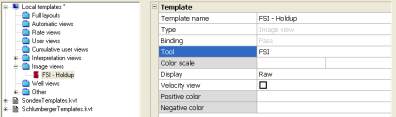
Settings – Default display – Templates: add in the Local templates a new image view template
using
button. Call it ‘FSI - Holdup’ and set the ‘Tool’ to FSI.
Fig. B08.17 • creation of an image view template
Validate on OK, and in the display toolbar, Invoke the template with .
Select the ‘FSI – Holdup’ template we just created and OK.
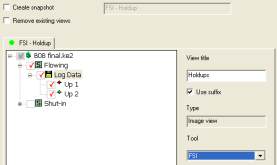
In the next dialog, expand the nodes and tick both Up1 and Up2 of the Flowing survey, change
the view title to ‘Holdups’, tick ‘Use suffix’ (the short name of the survey will be added to the
view title, followed by pass type and index) and ensure that the tool to is set to ‘FSI’.
Fig. B08.18 • Image view dialog
A snapshot of both images could be created by selecting the ‘Create snapshot’ option, but we will
rather add these views to an existing snapshot.
Press OK to create the views.
Recall the ‘FSI Optical probe View’ snapshot and add both images to the display. Update the
snapshot.

