Page 158 - Emeraude 2.60 Tutorial
Basic HTML Version
Emeraude v2.60 – Doc v2.60.01 - © KAPPA 1988-2010
Guided Interpretation #8 • B08 - 14/25
Choose to initialize from the Shut-in interpretation in order to retrieve the ‘Spinner Calibration
(zones and lines)’. This is the default choice. Click on OK.
In the ‘Interpretation Settings’ dialog, it can be checked that the calibration type has been
correctly carried on from the Shut-in survey interpretation. Click OK.
Select PVT and define a saturated oil + water; Salinity = 26000 ppm; bubble point = 236.6
Bar @ 85°C; match this constraint and accept to change the GOR.
Accept default PVT for Gas.
B08.3.1 • Apparent velocities
When creating the interpretation, the spinner calibration was copied from the shut-in survey and
done on a zone not covered by the flowing data. If you go to ‘Calibrate’, you will see the slopes
and thresholds of every spinner but no data.
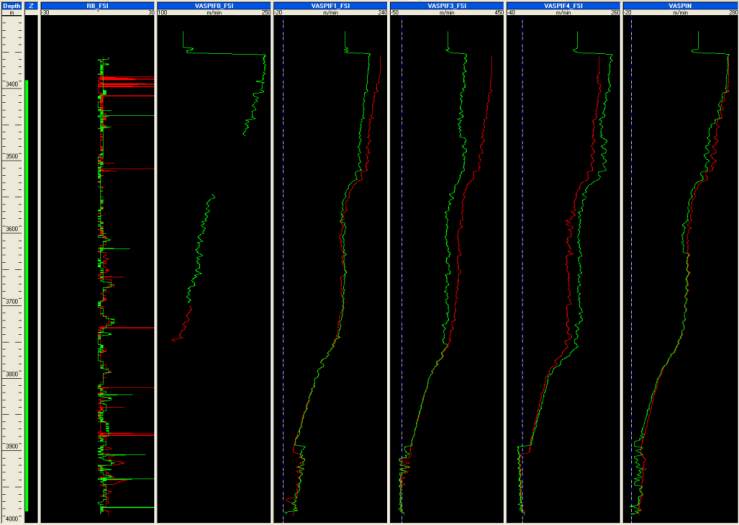
Click on ‘V apparent’ and accept all defaults to generate the apparent velocities.
Create a layout with the Vapp views and RB_FSI (see below).
Add the corresponding snapshot ‘Vapps’.
Fig. B08.20 • Apparent velocities and relative bearing
Some data parts are missing in both passes for VASPIF0_FSI as erratic data was removed from
the files. VASPIF2 is not generated as the probe is ignored at the tool level.
B08.3.2 • MPT Processing
The MPT processing allows calculating, at any depth, one centered value from distributed
measurements. This possibility is offered by reconstructing the probe measurements on the basis
of a 2D representation of the holdups and the velocity, with the possibility of adding external

