Page 57 - Emeraude 2.60 Tutorial
Basic HTML Version

Emeraude v2.60 – Doc v2.60.01 - © KAPPA 1988-2010
Guided Interpretation #2
•
B02 - 17/22
B02.4.2
13B
• Spinner calibration and apparent velocity
Select the ‘Survey’ panel.
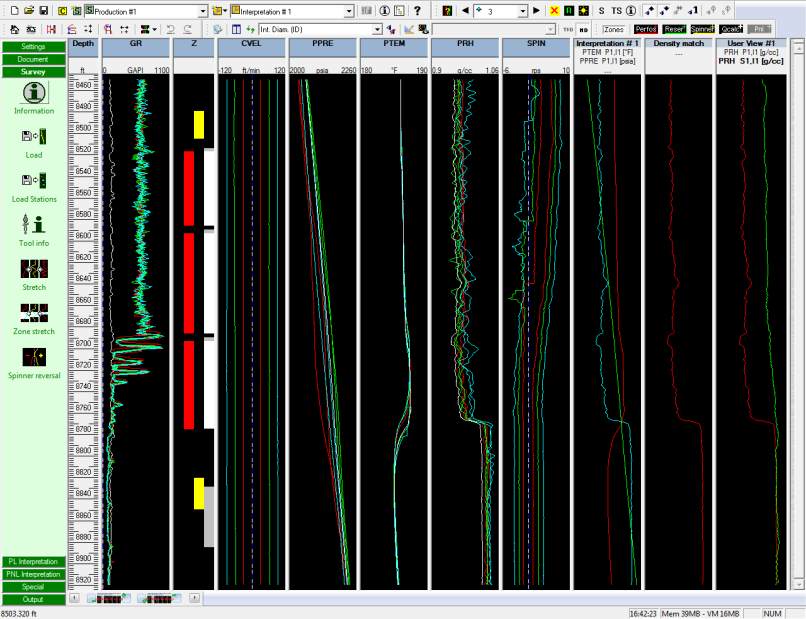
The Up spinner passes need to be reverted, but the reversal is not for the entire pass. Note
that spinner reversal is for non-directional spinners only. The reversal could be defined
around the following depths:
Up1=8640 ft
,
Up2=8580 ft
,
Up3=8560 ft
.
The procedure for each pass is the same as applied for the shut-in:
Make the pass active in the drop list of the top toolbar.
Click on Spinner reversal.
Click in the flowmeter plot around the indicated depth.
Accept the defined depth and reversal direction (below).
Reset the horizontal scale when done
Fig. B02.23 • Reversal defined
Return to the ‘Interpretation’ panel.
Click on ‘Calibrate’. The slopes and intercepts have been carried over from the shut-in, but
we will recompute them.
In ‘Actions for all zones select to ‘Recompute all (no imposed threshold)’
Make the top zone active, and click on the leftmost data point (blue) on the cross-plot with
the left mouse button.
A dialog appears indicating that this point is from Up3.

