
KAPPA-Automate IT Infrastructure

Kubernetes

Kubernetes is a powerful, extensible platform designed to manage and orchestrate containerized applications (such as those packaged with Docker). It provides a consistent way to deploy, scale, monitor, and maintain applications across clusters of machines—whether physical, virtual, on-premises, or in the cloud. Kubernetes automates key operational tasks such as:

  • Scaling applications automatically based on resource usage or demand

  • Load balancing incoming traffic between running services

  • Rolling updates and rollbacks for zero-downtime deployments

  • Self-healing, automatically restarting or rescheduling failed containers or pods

  • Resource management, ensuring workloads get the CPU/memory they need

Kubernetes is commonly used for microservices architectures, where applications are decomposed into smaller, independent components that can be deployed and updated individually. These components include Pods, Containers, Nodes, StatefulSets, Persistent Volumes, Persistent Volume Claims, and more.

For KAPPA-Automate, Kubernetes serves as the underlying platform hosting and managing the entire KAPPA-Automate infrastructure. It is responsible for orchestrating:

  • Nodes – the machines in the cluster

  • Pods – the smallest deployable units that run the application components

  • Containers – the microservices and workloads inside each Pod

  • StatefulSets – for managing stateful components where identity and storage persistence matter

  • Persistent Volumes (PVs) – storage resources available to the cluster

  • Persistent Volume Claims (PVCs) – storage requests by applications

In OpenLens, these resources can be inspected visually. This ensures KAPPA-Automate runs reliably, consistently, and can scale or recover as needed.

With OpenLens, administrators can continually monitor the health of KAPPA-Automate, detect anomalies, and troubleshoot issues through a centralized visual dashboard, enhancing operational efficiency and reducing time-to-diagnosis.
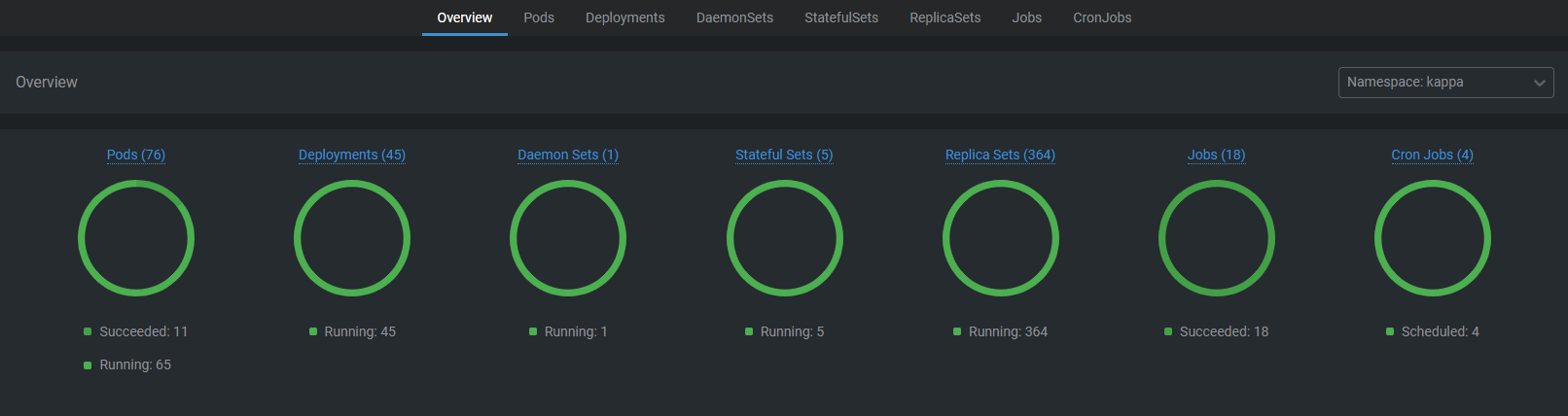
1_Overview.png

Component

Key Symptoms

Primary Diagnostics

Fix/Remediation

Nodes

  • Node in NotReady state

  • High CPU/memory/disk pressure•

  • Network or runtime issues

  • kubectl describe node to inspect conditions and pressures

  • OpenLens node view for runtime, resource, and pod status

  • Check kubelet logs for underlying failures

  • Restart kubelet or Docker/Container

  • Free disk space or increase resources

  • Fix CNI/network plugin issues

  • Resolve hardware or VM resource exhaustion

Pods

  • CrashLoopBackOff due to app or config errors

  • ImagePullBackOff from registry or auth issues

  • Initialization or readiness probe failures

  • kubectl logs for container/app logs

  • kubectl describe pod to inspect events

  • Review image, environment variables, and probe configs

  • Fix image name/tag or registry permissions

  • Tune resource requests/limits to avoid OOM

  • Correct failing liveness/readiness probes

  • Fix configuration values causing restarts

Containers

  • Application crashes or exits unexpectedly

  • Misconfigured startup commands

  • Missing environment variables or files

  • Container logs for runtime errors

  • kubectl exec shell to inspect filesystem and runtime environment

  • Check entrypoint and command definitions

  • Correct environment variables and secrets

  • Fix entrypoint/command arguments

  • Patch code bugs or dependency failures

  • Ensure required config files and mounts exist

StatefulSets

  • Volume mount or attach failures

  • Incorrect pod ordering or startup sequencing

  • Pods stuck waiting for PVCs

  • kubectl describe statefulset for orchestration details

  • Inspect PVCs/PVs for binding and health

  • Validate headless service configuration

  • Ensure headless service exists and matches STS name requirements

  • Verify StorageClass supports stable volume provisioning

  • Fix PVC size, mode, or missing storage

PVs (Persistent Volumes)

  • PV stuck in Released or Failed state

  • Not binding to PVCs as expected

  • Wrong StorageClass attached

  • kubectl describe pv to see claimRef, reclaim policy, and errors

  • Check underlying storage backend (EBS, NFS, etc.)

  • Update or fix StorageClass

  • Remove dangling claimRef or recreate PV

  • Rebuild storage if persistent disk is corrupted or inaccessible

PVs (Persistent Volumes)

  • PVC stuck in Pending state

  • Not binding to expected PV

  • Size or access mode mismatch

  • kubectl describe pvc to inspect binding events

  • Compare requested StorageClass, access mode, and size with available PVs

  • Modify PVC to correct size, access mode, or StorageClass

  • Ensure matching PVs exist

  • Fix quota or limitRange issues blocking provisioning