Multiwell Load Data Source Configuration
Multiwell load data source configuration defines how the external data service interprets and maps database tables, fields, and measurement units into the KAPPA-Automate data model. Each configuration is represented as a JSON object, which encapsulates all settings for the multiwell load data source. The name field defines a unique name identifying the data source. The description field provides a short summary of its purpose or function. The pluginId field specifies the identifier of the plugin or adapter responsible for interfacing with the external data source (SQL Server or Snowflake). The configuration field specifies the required parameters and connection settings essential for the plugin’s functionality.
{
"name": "KAPPA SQL Multiwell - SPE View",
"description": "Multiwell datasource for KAPPA SQL Schema",
"pluginId": "b459783e-bbfc-4355-9983-cb5ab6550e57""configuration": {...}
}
This section presents the standardized multiwell load configuration template for the KAPPA SQL schema:
Database tables mapping
The table mappings section defines how the system connects to and interprets specific tables in the SQL database. It tells the plugin where to find well information, wellbore definitions, parameters, and dynamic data, and how to link these tables together using unique identifiers. These mappings allow the system to connect static and dynamic data logically. In the KAPPA SQL database, the wellTable acts as the central reference, while the other tables provide additional layers of information tied to each well. Each database table (wellTable, ParametersTable, dynamicMetaTable, dynamicTable, TrajectoryTable, WellboreFlowConditionsTable, WellboreTubingTable, and WellboreCasingTable) is structured as follows:
"wellTable": {
    "schema": "dbo",
    "table": "well",
    "baseIdColumn": "WellId"
}
Mapping definitions
The mappingForDbParameterStrings section is responsible for translating unit and data type strings from an external SQL database into the KAPPA-Automate. This mapping ensures that physical quantities and data types are consistently interpreted within KAPPA-Automate, regardless of the naming conventions used in the data source. Unit strings from the external data source are mapped to KAPPA-Automates internal unit definitions. This ensures that measurements (e.g., pressure, temperature, or flow rate) are consistently recognized, even if the units are labeled differently in the data source (e.g., ‘psia’ vs. KAPPA-Automates internal ‘PressurePsiaUnit’). Data type mapping is required when the data type name in the data source does not match any built-in KAPPA-Automate data type. This is especially relevant for dynamic data. For example, the FLP (Flowline pressure gauge) data type is not defined in KAPPA-Automate. It can be mapped to a built-in KAPPA-Automate data type as P (pressure), or a custom data type can be created in KAPPA-Automate to match the source definition. If the data type in the source matches an existing KAPPA-Automate data type exactly, no mapping is required.
"mappingForDbParameterStrings": {
    "ft": "LengthFeetUnit",
    "psia": "PressurePsiagUnit",
    "FLP": "P"
}
The mappingsToWellKnownProperty section defines the mapping of well properties between the data source and the built-in well properties in KAPPA-Automate. The mapping is based on matching the corresponding aliases defined in both the external SQL database and KAPPA-Automate.
"mappingsToWellKnownProperty": {
    "InitialResPressure": { "Property": "MainResults_InitialPressure" }
    "Porosity": { "Property": "MainResults_Porosity" }
    "WbRadius": { "Property": "TestParameter_WellboreRadius" }
}
This MappingsToUserDefinedProperty section defines the mapping of well properties that are not present in the KAPPA-Automate well property catalog. For numeric data types, the unit of measurement must be specified; otherwise, the property will be imported as a ‘string’ type. Since these custom well properties are not defined in the KAPPA-Automate catalog, they will be created automatically using the same alias and name provided in the data source. However, if the user wants to change the name from the one used in the database to the one used in KAPPA-Automate, this can be done by adding a ‘Property’ entry here as well.
"MappingsToUserDefinedProperty": {
    "Tvd": {"Property": "True Vertical Depth", "Measurement": "Depth" },
    "BubblePointPressure": {"Measurement": "Pressure" },
    "SepTemperature": {"Measurement": "Temperature" },
    "WellSpacing": {"Measurement": "Length"},
    "Reservoir": {}
}
The filterParameters section defines which parameters should be exposed as filters in the user interface (UI). Filters enable the selective import of specific wells by applying criteria based on available parameters. Currently, filtering is limited to two levels, and their order determines the filtering behavior. For instance, to import only wells from a designated reservoir within a certain geographic area, filters can be configured using ‘State’ and ‘Reservoir’ parameters. These filters are represented in the UI, where the tags displayed in the dropdown menu correspond to the active filter criteria.
"filterParameters": [ "State", "Reservoir" ]
The GroupingParameters section allows the configuration of parameters used to perform automatic well grouping. When a multiwell load is triggered, wells will be automatically grouped based on the specified parameter(s). For example, if ‘well type’ is defined as the grouping criteria, the multiwell load will create well groups such as Oil Producers and Gas Producers.
"GroupingParameters": [ "WellProdType" ]
The mirroringDataSource identifier referencing the mirroring data source.
The connectionString is the string used to access the SQL Server database. The complete JSON configuration structure for KAPPA SQL Schema.
{
"name": "KAPPA SQL Multiwell - SPE View",
"description": null,
"configuration": {
    "mirroringDataSource": "79eb30ca-222a-469d-abd1-319c3548cb5e",
    "wellTable": {
        "schema": "dbo",
        "table": "well",
        "baseIdColumn": "WellId"
},
"ParametersTable": {
    "schema": "dbo",
    "table": "parameters",
    "baseIdColumn": "WellId"
},
"dynamicTable": {
    "schema": "dbo",
    "table": "dynamic",
    "baseIdColumn": "VectorId"
},
"dynamicMetaTable": {
    "schema": "dbo",
    "table": "dynamic_meta",
    "baseIdColumn": "WellId"
},
"mappingForDbParameterStrings": {
    "psia": "PressurePsiaUnit",
    "STB/d": "RateStandardBarilPerDayUnit",
},
"mappingsToWellKnownProperty": {
    "Name": {
        "Property": "Well_Name"
    }
},
"MappingsToUserDefinedProperty": {
    "BubblePointPressure": {
        "Measurement": "Pressure"
    }
}
"filterParameters": [ "State", "Reservoir" ]
"connectionString": "Server='Server','Port';Initial Catalog='DATABASE';User ID=USER;Password=*****;"
}
"pluginid": "b459783e-bbfc-4355-9983-cb5ab6550e57",
"fileFormats": null
}
Once the configuration is complete, it must be submitted to the appropriate KAPPA-Automate instance via a POST request to the MultiWellLoadDataSourceCommand endpoint. The most convenient way to perform this POST request is through the ExternalData Swagger API interface, which provides a user-friendly way to interact with the API.
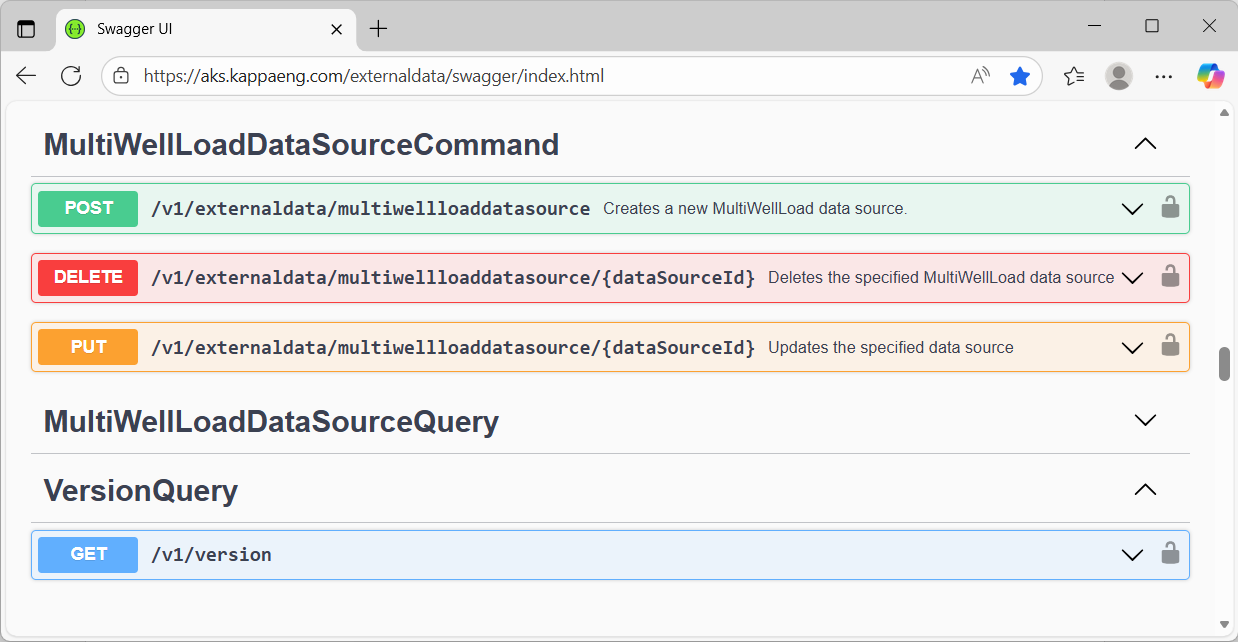
External Data Swagger API interface
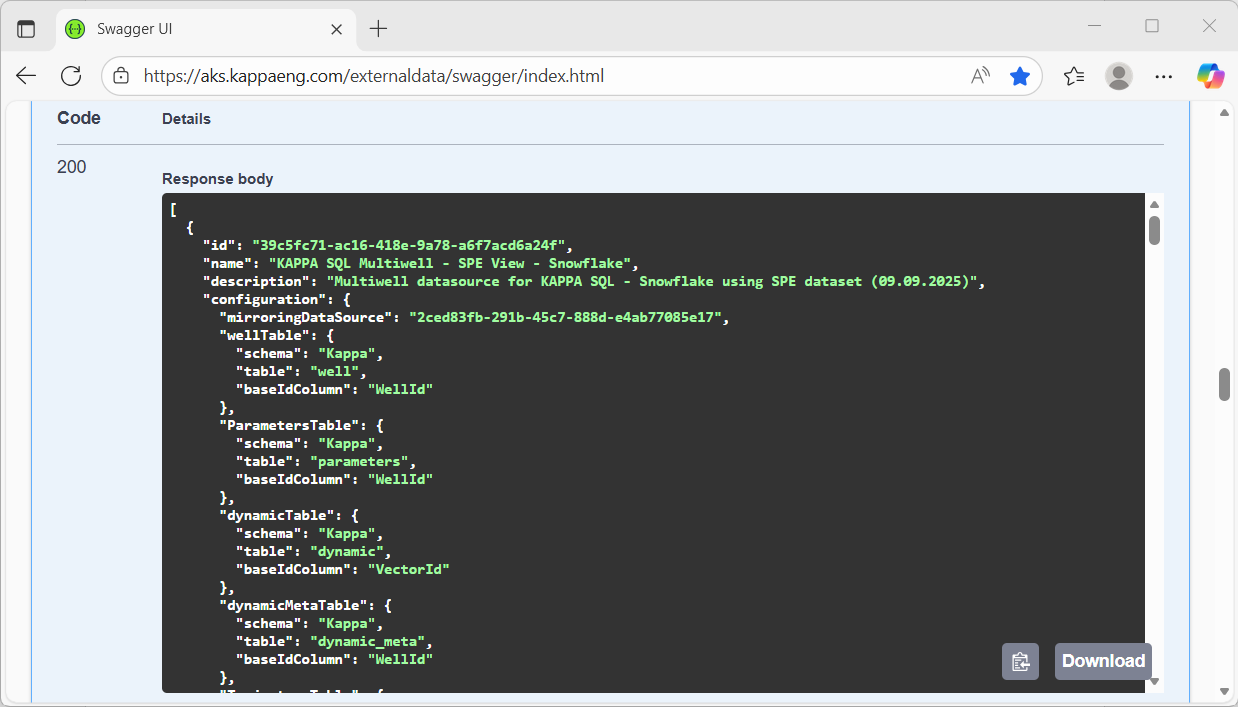
Multiwell load data source - POST request