Handling Unschedulable Volumes Due to High Disk Usage
Context
Longhorn automatically marks nodes as unschedulable when their allocated or used disk space exceeds a threshold (typically 80%). This prevents new volume replicas from being scheduled on nodes that may not have enough space, ensuring cluster stability.
Identifying Unschedulable Nodes
Navigate to the Longhorn UI → Nodes section. Look for nodes marked as Unschedulable. Check the Allocated Disk and Used Disk columns: nodes with disk usage above 80% will be flagged, colored bars visually indicate usage levels.
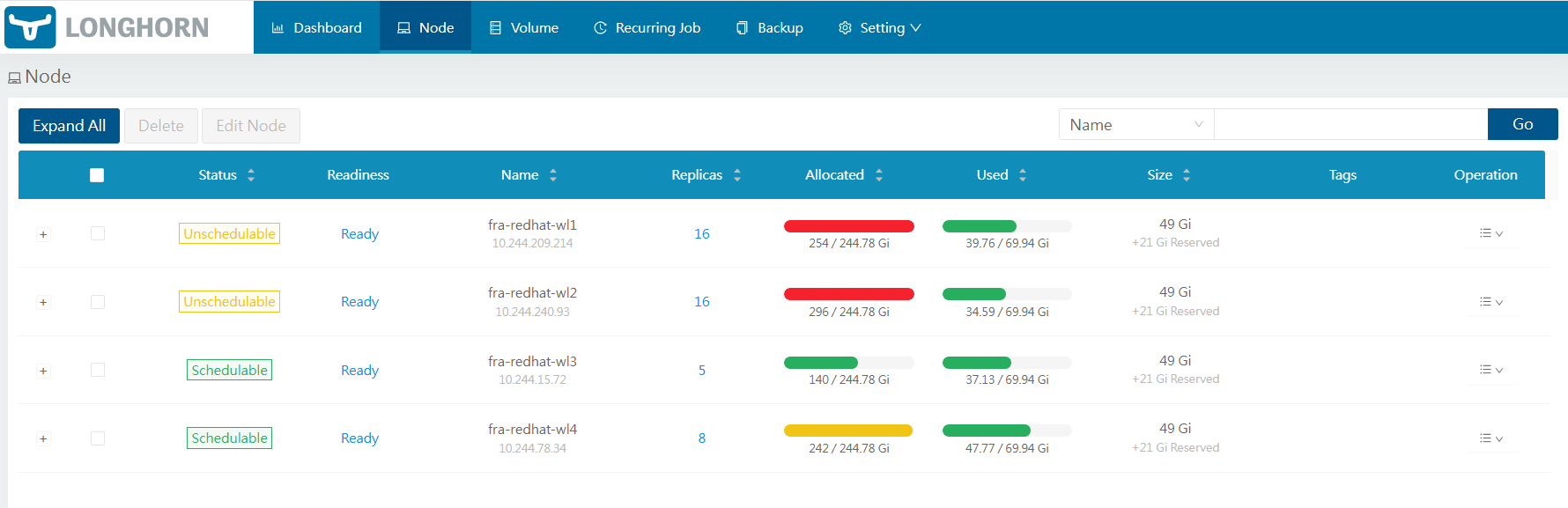
Example of unschedulable nodes with allocated disk space exceeding the threshold
Resolution Steps
Option 1: Free Up Disk Space. Delete unused volumes or snapshots. Clean up temporary files or logs on the node.
Option 2: Increase Disk Capacity. Expand the disk attached to the node.
Option 3: Adjust Scheduling Thresholds. Go to Settings → Storage Over Provisioning Percentage. Increase the value to allow more allocation (use with caution)