Incremental PTA (iPTA)
Incremental Pressure Transient Analysis (iPTA) automates the analysis of successive shut-ins using an existing Saphir analysis as a reference (seed document). Once the initial analysis has been validated, iPTA automatically detects newly available shut-ins, extracts the corresponding pressure transient data, and applies the seed model and analysis settings to each new event. Depending on the selected workflow type, iPTA can:
Perform extraction only for each new shut‑in.
Extend the reservoir model.
Or improve model parameters.
Typical iPTA Workflow
An iPTA workflow generally follows these steps:
Create and validate an initial PTA analysis in Saphir by the engineer.
Upload the Saphir document into KAPPA Automate.
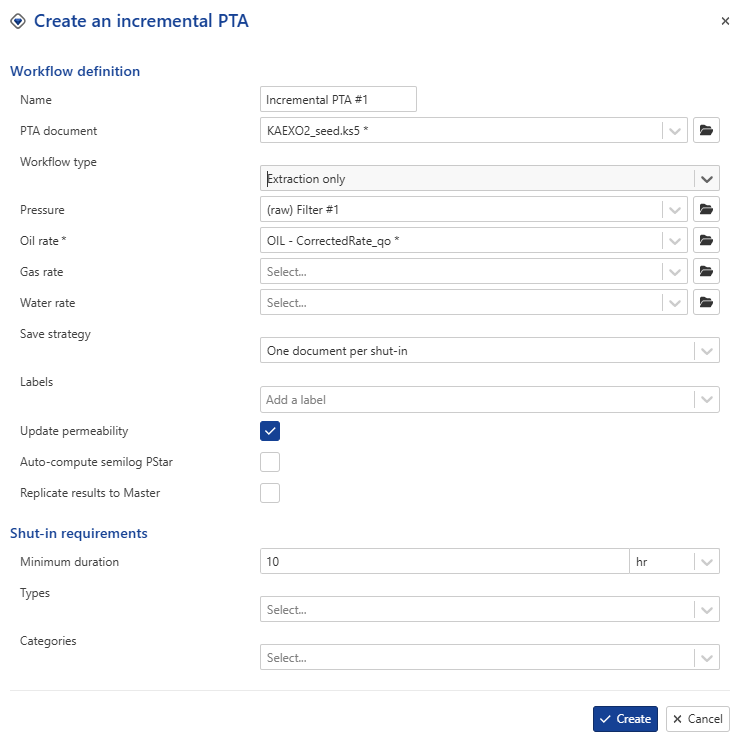
Create an iPTA workflow using the uploaded document as the seed.
Select the desired workflow type and processing options.
iPTA automatically detects newly validated shut-ins.
Each new shut-in is extracted and analyzed.
Results are stored in new or existing Saphir documents according to the selected save strategy.
Well properties can optionally be replicated automatically to the Master container (which can serve as the valid results container.)
Note
The seed document is the reference PTA analysis used by iPTA. It contains the initial pressure transient Analysis, model definition, fluid properties, and analysis settings provided by the engineer that will be used in subsequent shut-ins.
iPTA Workflow Types
There are four types of iPTA workflows available:
Autonomous: This is the only available option if the selected PTA document is empty (containing only PVT). The data up to a given shut-in will be sent to the PTA Service which will perform the extraction. The test info in the seed document will be overwritten by the parameters taken from the well properties container chosen as input or or from fallback values entered in the workflow. This scenario extracts each new shut-in, matches the diagnostic tools and estimates permeability and skin. If the user is not satisfied with the auto match, it is possible to manually adjust diagnostic tools (currently, the user can move the IARF line and the constant well bore storage).
Extraction only: This is the only available option if the selected PTA document does not contain a model. The data up to a given shut-in will be sent to the PTA Service which will perform the extraction. This scenario extracts each new shut-in, matches the diagnostic tools and estimates permeability and skin. If the user is not satisfied with the auto match, it is possible to manually adjust diagnostic tools (currently, the user can move the IARF line and the constant well bore storage).
Extraction with model: In addition to Extraction of the shut in, the model in the PTA document is extended up to the shut-in being processed. In this mode, the goodness of fit can be tracked to evaluate if the seed model is still applicable.
Note
The Goodness of Fit (GoF) provides an indication of how model matches the measured pressure response. Tracking the GoF over time helps identify when the original seed model is no longer representative of reservoir behavior.
Extraction with model + improve: In addition to Extraction with model explained above, if this option is selected, an improve strategy is requested by the user at the time of iPTA creation. The user can specify what model parameters to improve on, their ranges, set the improve targets and their weights, and add a fast model parameters and set its parameters. During execution, after the model has been extended to the processed shut-in, an improve of the loglog plot is performed.
It is possible to manually or automatically discard the wellbore storage data from the objective function by using "Min elapsed time" for manual exclusion or by using the "Locate and ignore wellbore effect" parameter—provided the algorithm successfully detects the end of wellbore storage.
The table below summarizes the iPTA modes.
iPTA Mode | Prerequisite (Seed Document) | What it does | User editing |
|---|---|---|---|
Autonomous | Empty (containing only PVT) | Saphir document created using info in the well properties container. Extracts each new shut-in, matches the diagnostic tools and estimates permeability and skin. | Interactively inside K-A (the user can edit the diagnostic lines). |
Extraction Only | Must contain an extraction | Extracts each new shut-in, matches the diagnostic tools and estimates permeability and skin. | Interactively inside K-A (the user can edit the diagnostic lines). |
Extraction with model | Must contain a model | The model in the seed document is extended up to the shut-in being processed. | Open file in K-W to edit model. |
Extraction with model + improve | Must contain a model | Improve on loglog plot, regressing on user defined parameters | Open file in K-W to edit model. |
Multiphase iPTA
In situations where the initial PTA document contains multiphase production data, multiphase rate inputs can be used in an incremental PTA. It is possible to integrate the total rate computation derivative extraction.
 |
Handling Saphir documents
There are two ways users can create/update Saphir documents with iPTA:
Single document with one analysis per shut-in: any new data are sent to the ‘PTA document’ defined in the iPTA creation wizard and a new analysis is created for each shut-in. A maximum of 10 analyses can be created in a single document, after which a new document will automatically be created. Each document contains data from the start of the production history up to the time the iPTA workflow is executed.
One document per shut-in: Each shut-in is extracted in a new document. Input data in each document are truncated at the end of the corresponding extraction period.
Extracting / Viewing iPTA Results
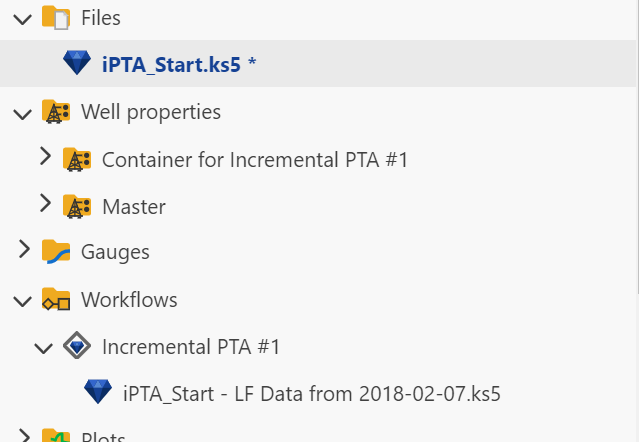
When an iPTA is first launched, it will create a new container under Well properties node in the field hierarchy, named Container for <iPTA Name>. A new folder called Workflows will also be created in the field hierarchy, with the iPTA and any files created by this iPTA listed there:
 |
One can run several workflows in parallel and compare them.
It is also possible to copy from in iPTA container into the Master container. If Replicate results to Master flag was enabled when creating the iPTA, this will be done automatically for all shut-ins being processed by the iPTA task.
Alternatively, users can selectively replicate results for some analyses only to the Master well properties container (see Result Replication into Master Well Properties for more details).
iPTA automatically updates the Saphir file when the last shut-in period is extended
When the engineer extends the end time of the last validated shut-in, the extraction period in the corresponding iPTA will be automatically extended.
If a model already exists, it will be regenerated to reflect the new extraction end.
The diagnostic tool and model parameters will remain unchanged.