Well Properties
Well properties are scalar values that are stored per well. The well properties values are entered manually or populated via data import processes (files loading, results extraction, results replication) and also can be calculated by different means e.g., user tasks.
Any generic well property has the following properties:
Alias: a short human-readable identifier e.g., WHlat
Name: a human-readable caption e.g., Well head latitude
Comment: free text field for user comments
Built-in: flag which defines whether a well property is read-only or not. Built-in properties are read-only
Each well property can store a value (values) of one of the following types:
String
Date/Time
Flag (Boolean)
Numeric (with valid dimension/measure)
Event
Enum
Types of Well Properties
Well properties may be split in two categories:
Standard Well Properties
These properties include things like well coordinates. They can be updated and a history of all values is kept. However, only the last values are exposed in the Well Info page (under the Well properties section) and in the Well Flat View. These well properties are typically imported from the load of IHS *.98c files. They can also be entered/edited in the Well Flat View.
Well Results
Well result properties are dedicated to the management of results extracted from KAPPA-Workstation documents using the result_SI.xml document. To extract these properties, the Path to them in the result_SI.xml document must be specified in the Well Properties Catalog. The Extract flag determines whether these properties will be extracted from KAPPA-Workstation document stored in a given field.
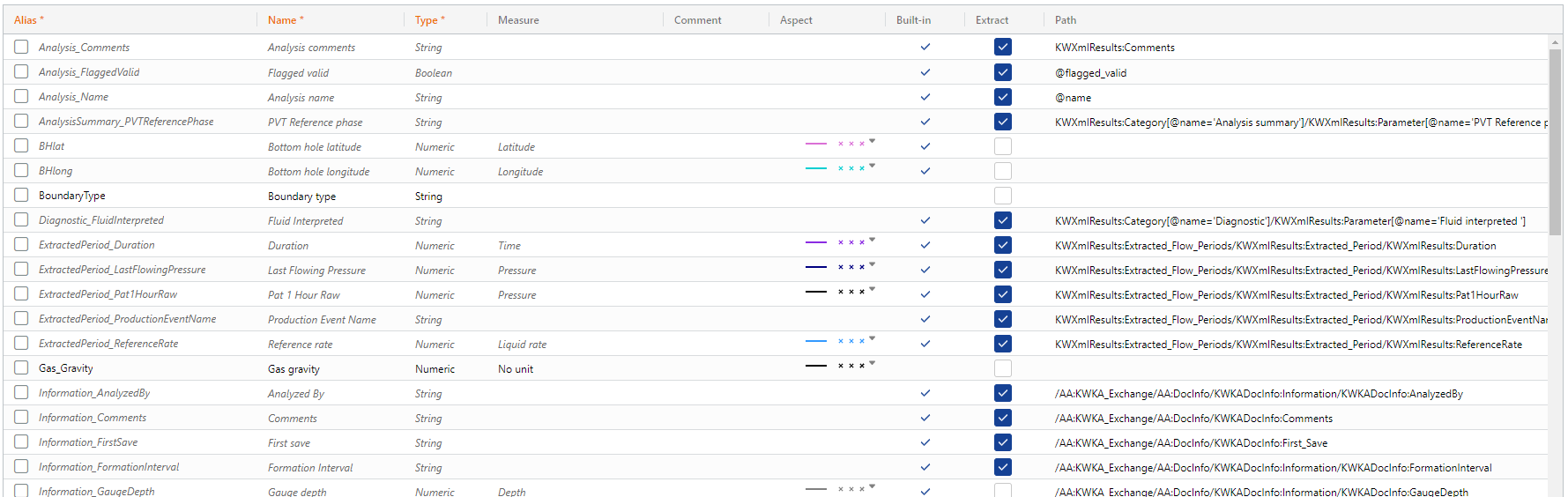 |
These properties can be displayed as time series on plots and also used to display Bubble Maps on Maps.
Well Property Catalogs
Well properties are defined through catalogs:
Globally — there is a single default catalog, reusable for any new field. The Global catalog can be accessed in the Model page under Automation Mode.
Per field — when creating a new field, the Global catalog is duplicated under the field (see Creating a New Field). It can be customized during field creation by toggling to the Well properties tab in the field creation dialog. Alternatively, it can be customized after a field is created by selecting the field node in the field hierarchy and toggling to the Well properties tab.
Note
It is now possible to copy well properties between the global catalog and the field catalog in both directions, using this button  to copy from the global catalog to the field catalog or this button
  to copy from the field catalog to the global catalog.
It is also possible to pull newly added properties from the global catalog into the field catalog by clicking on this button  .
.