Properties Plots
Properties plot is a plot that can contain as many well properties as necessary for one well or multiple wells. Properties plots cannot be saved, the user can only view the plot.
Well properties should be present in the Master container of the well for which the user wants to see the properties plot.
Select any well in the field hierarchy.
Click Properties plot,
 , at the top under the Info tab.
From the Wells drop-down menu, select the wells to be displayed. To select several wells, activate the Multiple wells option.
Tip
Using the Browse button allows displaying the Field hierarchy and its respective wells. Wells can be picked from there. Click on Apply to confirm the selection.
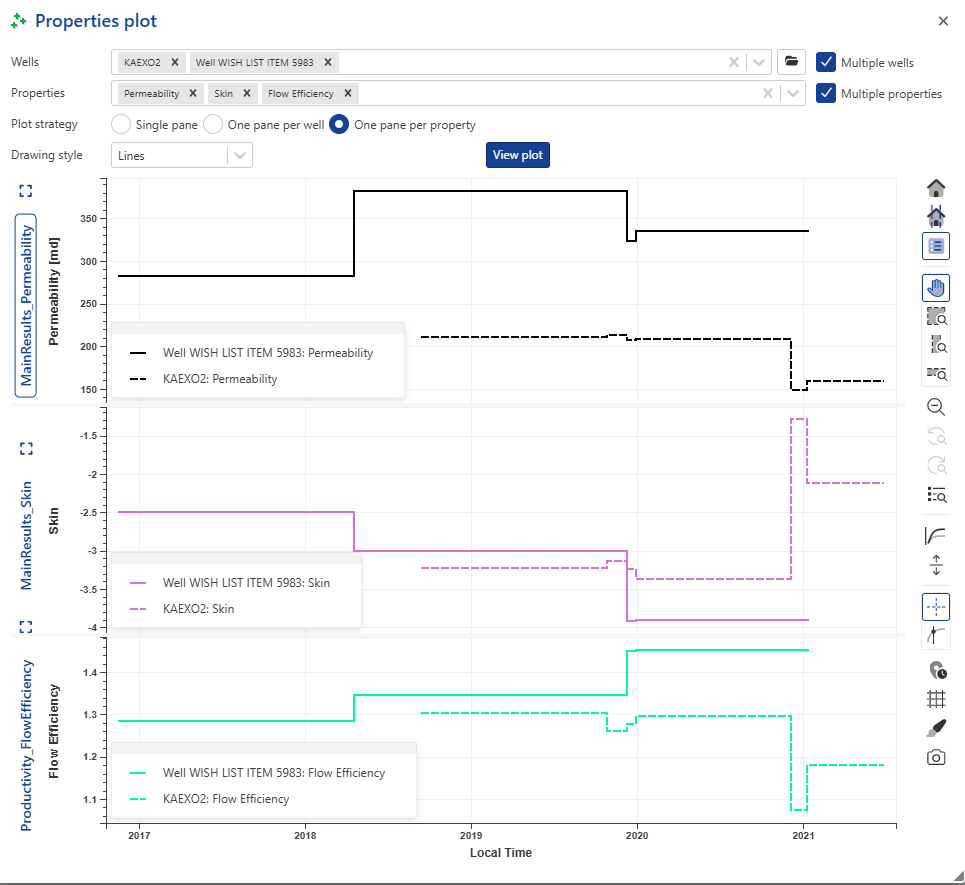
Choose one or several properties from the Properties drop-down list. Activate the Multiple properties option to select several properties from the list, e.g., Flow Efficiency, Permeability, Skin.
Select the Plot strategy:
Single pane: all the different well properties are displayed on a single pane.
One pane per well: each well is displayed with its own properties in a dedicated pane.
One pane per property: each well property is displayed in a separate pane. If several wells are selected, their respective properties are shown in the same pane.
Click View plot. Each time you want to change the plot strategy, click View plot to refresh the selection.