Reference
Inside a well, each group of datasets having the same data type will always have one reference channel which is marked by a * in the hierarchy if there is more than one channel of the type.
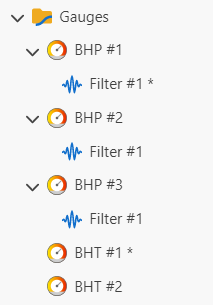 |
When reference channel is selected in the hierarchy the Reference check box in the top tool bar is checked 
If there is a mandatory input of the type in the dialog for a function or user task instance creation, this channel is suggested as an input one by default; the rest channels with the same data type can be available through the dropdown list.
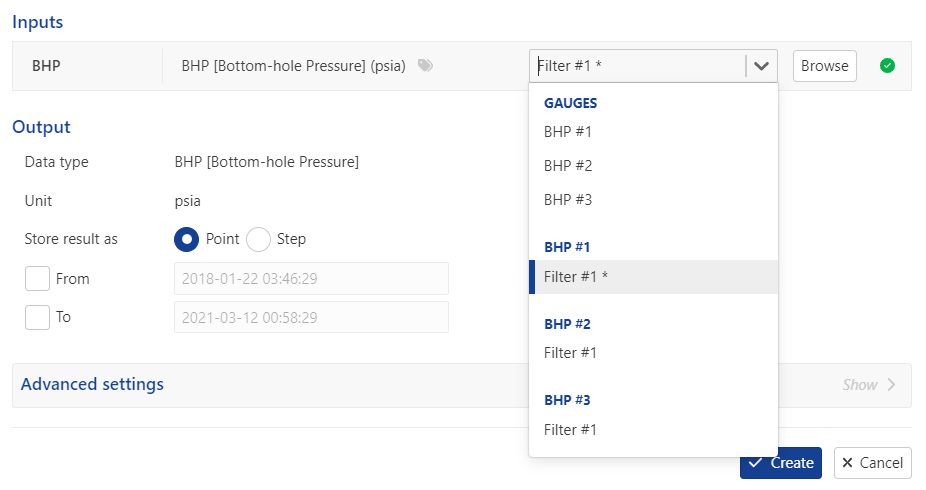 |
Note
By default the reference channel is the first loaded channel of the data type, but sometimes it can be changed automatically according to K-A inner logic when a user makes some actions. For example if a first pressure gauge channel loaded, it is marked as reference one however the first created filter for this gauge will automatically takes over the reference right.
The reference can be changed by a user manually or by means of a user task.
Setting a Reference
Select in the hierarchy the channel you want to mark as reference.
Check the Reference box,
, at the top or right click and select Set as reference in the pop up menu.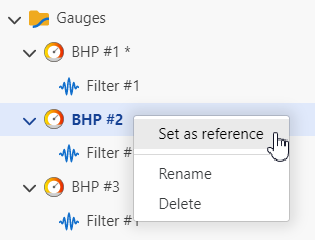
Note
The same principle of assigning reference flag is applied to files of the same type.
Note
Default selection for well properties is organized a bit differently. Well properties belong to containers; Master container is a default container for the selection and the properties in the container are reference ones. The references for the properties cannot be reassigned.